

Table of Contents
Port mapping is a fundamental concept in computer networking that is critical in facilitating communication between devices on a network. It involves translating network port numbers from one address space to another, typically between private and public IP addresses. This process enables various network services and applications to function properly.
Introduction to Port Mapping
Port mapping is a crucial networking concept essential for effective data transmission. It involves the translation of communication ports between a private network and a public network, enabling seamless exchange of information. By assigning specific ports to different services, port mapping facilitates the efficient routing of data packets, optimizing network performance. This process is vital in online gaming, video streaming, and file-sharing scenarios, where uninterrupted connectivity is paramount.

Fundamentals of Networking
Networking fundamentals form the backbone of modern communication systems, facilitating seamless data exchange across various devices and platforms. At its core, networking involves the interconnection of computers and other devices to share resources and information. This interconnectedness relies on protocols and standards governing data transmission, such as TCP/IP, Ethernet, and Wi-Fi. Understanding networking fundamentals is crucial for designing, implementing, and maintaining efficient network infrastructures.
Mechanism Behind Port Mapping
Port mapping is a vital network mechanism, facilitating efficient data transmission by translating communication ports between private and public networks. It assigns specific ports to different services, optimizing the routing of data packets. This process is essential for maintaining uninterrupted connectivity, particularly in online gaming, video streaming, and file sharing. By meticulously configuring port mapping, networks can ensure smooth data flow, enhancing user experience while fortifying network security.

Types of Port Mapping Techniques
Various port mapping techniques exist, each tailored to different networking scenarios. One method is Static Port Mapping, where specific ports are permanently assigned to particular services, ensuring consistency in data routing. Dynamic Port Mapping dynamically allocates ports as needed, enhancing flexibility but requiring robust management to avoid conflicts. Port Triggering initiates port mapping based on triggered events, allowing temporary port openings for specific applications. Universal Plug and Play (UPnP) automates port mapping for devices within a network, simplifying setup but potentially compromising security.
Security Implications of Port Mapping
Port mapping, essential for efficient data transmission, can pose security risks if not managed properly. One major concern is port exposure, where open ports become potential entry points for unauthorized access and malicious attacks. Attackers can exploit open ports to infiltrate networks, launch denial-of-service (DoS) attacks, or exploit vulnerabilities in services running on those ports.

To mitigate these security risks, network administrators should adopt best practices such as:
- Implementing access controls and firewalls to restrict access to open ports.
- Regularly monitoring network traffic and auditing port configurations to detect and address any anomalies or unauthorized access attempts.

- Encryption and secure protocols (e.g., HTTPS, SSH) protect data transmitted through mapped ports.
- Intrusion detection/prevention systems (IDS/IPS) are used to detect and block suspicious network activity.
- Keeping software and firmware up to date to patch known vulnerabilities and reduce the attack surface.
Practical Applications of Port Mapping
Port mapping finds practical applications across various networking scenarios, optimizing data transmission and enhancing connectivity. One primary application is in home and small office networks, where Network Address Translation (NAT) routers use port mapping to allow multiple devices to share a single public IP address. This enables users to access the internet and online services simultaneously from different devices within the network.
Setting Up Port Mapping
Port mapping is essential for optimizing network performance and enabling seamless data transmission. Begin by accessing your router’s configuration interface through a web browser. Locate the port forwarding or virtual server settings, where you can specify the internal IP address of the device you want to forward traffic to and the corresponding port numbers. Ensure you choose the appropriate protocol (TCP or UDP) for each port mapping entry. After saving your settings, test the port mappings to confirm successful configuration and ensure proper functionality.

Do you Need to Restart the Router After Port Forwarding?
Restarting the router after port forwarding may be necessary in certain scenarios, but it’s only sometimes required. The need for a router restart depends on various factors:
- Router Model: Some router models may require a restart to activate port mapping changes.
- Configuration Response: If you’ve configured port forwarding but encounter no response, restarting the router might be necessary to ensure the changes take effect.
- Connectivity Issues: If connectivity problems persist even after configuring port mapping, restarting the router can help resolve these issues.
Is Port Forwarding Good for Games like Fortnite, Call of Duty, and Warzone?
Port forwarding is crucial in optimizing the gaming experience for titles like Fortnite, Call of Duty, and Warzone, which rely heavily on online multiplayer interactions. Given the multiplayer nature of these games, opening multiple ports through port forwarding becomes essential to ensure seamless connectivity.
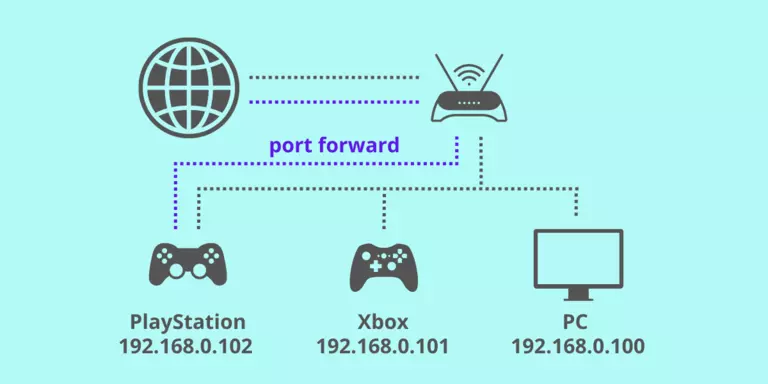
By enabling port forwarding, gamers can enhance their overall gameplay experience. It facilitates smoother connections, reduces latency, and improves matchmaking processes, ultimately leading to a more enjoyable gaming experience.
Tips for Effective Port Mapping Strategy
Port mapping, often used in networking and software development, is the process of mapping network ports on a host to specific services or processes running on that host. Here are some tips for devising an effective port mapping strategy:
- Understand Your Network Requirements: Before starting port mapping, thoroughly understand the network requirements of your application or service. Consider factors such as security, scalability, performance, and compatibility.
- Document Existing Port Usage: Document all port assignments and associated services or applications. This documentation serves as a reference point for understanding the current state of your network and avoiding conflicts during port mapping.
- Use Well-Known Ports Wisely: Well-known ports (0-1023) are reserved for common services like HTTP (80) and SSH (22). Use these ports judiciously and avoid conflicting with established standards unless necessary.
- Assign Ports Based on Functionality: Allocate ports based on the functionality of the services or applications they represent. Group related services together, making it easier to manage and troubleshoot.
- Consider Security Implications: Ensure your port mapping strategy aligns with security best practices. Avoid exposing unnecessary ports to reduce the attack surface and implement access controls such as firewalls and authentication mechanisms.
- Avoid Hardcoding Port Numbers: Hardcoding port numbers in your applications can lead to inflexibility and potential conflicts in the future. Instead, consider using configuration files or dynamic port allocation mechanisms.
Frequently Asked Questions
What is port mapping, and how does it work?
Port mapping involves translating communication ports between private and public networks to enable seamless data exchange. It assigns specific ports to different services, optimizing data routing and enhancing connectivity.
Why is port mapping important in networking?
Port mapping is essential for efficient data transmission and network optimization. It allows multiple devices to share resources and communicate effectively while maintaining security and managing traffic flow.
How do I set up port mapping on my router?
Access your router’s configuration interface through a web browser to set up port mapping. Locate the port forwarding or virtual server settings, specify the internal IP address of the device, and assign the corresponding port numbers for each service.
Is port mapping safe? Are there any security risks?
While port mapping is necessary for many networking applications, it can pose security risks if not configured properly. Open ports may become entry points for unauthorized access or attacks if not adequately managed. Implementing security measures such as firewalls and access controls to mitigate these risks is essential.
What are some practical applications of port mapping?
Port mapping finds applications in various networking scenarios, including home networks, online gaming, video conferencing, remote access, and network security. It optimizes data transmission, enhances connectivity, and enables seamless communication across devices and platforms.
Do I need to restart my router after configuring port mapping?
In some cases, restarting the router may be necessary to activate port mapping changes, especially if your router model requires it or if you encounter connectivity issues after configuration.
Conclusion
Port mapping is vital in modern networking, simplifying data transmission and enhancing connectivity across various devices and platforms. By translating communication ports between private and public networks, port mapping optimizes data routing, enabling seamless exchange of information. Its practical applications range from home networks to online gaming, video conferencing, and network security. While port mapping offers numerous benefits, it’s crucial to implement it securely to mitigate potential risks.